> For the complete documentation index, see [llms.txt](https://partyicons.gitbook.io/wiki/llms.txt). Markdown versions of documentation pages are available by appending `.md` to page URLs; this page is available as [Markdown](https://partyicons.gitbook.io/wiki/ekko-alpha-test-guide/log-in-and-wallet-binding.md).
# Log-in & Wallet Binding
(for EKKO ALPHA Test)
* Users must bind an EOA wallet on the official website to sync, mint and trade assets.
* ALL users need to log into the game or on the website with a social account first, and then bind it with an EOA wallet on the website. For users who have played the game before, please make sure to bind the Ronin wallet with your existing Party Icons assets again though you have bound this wallet with your game account during previous tests. (This is needed to restore and sync all your assets.)
* In the future, the game will be released as a traditional game client on the App Store, Google Play, and STEAM. All on-chain asset operations must be performed via the official website. Please ensure you bind your wallet and keep your wallet information secure.
**Step by Step Guide:**
1. Log into the Official Website or in Game with a Social Account
* Visit [www.partyicons.com](http://www.partyicons.com/) and click “LOGIN”

* Click "GAME ACCOUNT" on the login interface

* Log in on the website with your social account (take gmail as an example, please finish the verification process)\ 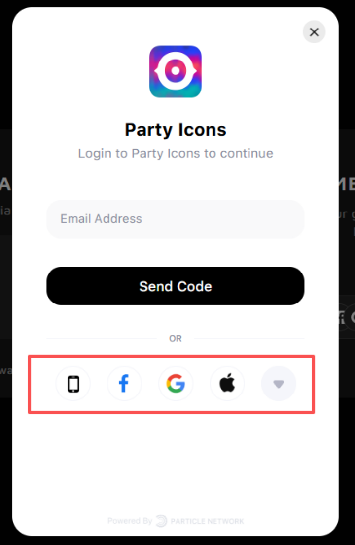 2. Bind a Wallet to the Game Account on the Website
* After the account is created successfully, return to the official website and a window to bind your wallet will pop up.
* Click the "Bind Wallet"

* Select Wallet Type
* Existing Users: please select the Ronin wallet that was bound to the website in the previous tests so your assets can be synced
* New Users: please bind a wallet you hope to store future Party Icons assets

3\. Troubleshooting Ronin Wallet Connection Issues
If the Ronin wallet fails to redirect or bind properly, please follow these steps:
* Log in to the Ronin Marketplace: Visit and log in to your Ronin wallet first.
* Return to the Website: Go back to the PartyIcons official website and restart the binding process to operate normally.
4. FAQ
What if I don't receive the verification code?
* Check your email spam folder.
* Confirm the email address was entered correctly.
* Click "Resend Verification Code".
What if the wallet binding fails?
* Ensure the Ronin wallet extension is correctly installed.
* Check your network connection.
* Try refreshing the page and binding again.
What if assets for existing users are not syncing?
* Ensure you are using the original Ronin wallet.
* Try logging into the official website again.
* Contact our MODs in Discord for assistance.
4\. Important Notes
* Please keep your wallet seed phrase and password safe.
* It is recommended to enable Two-Factor Authentication (2FA) to enhance account security.
* If you encounter any problems, please contact customer support in a timely manner.
2. Bind a Wallet to the Game Account on the Website
* After the account is created successfully, return to the official website and a window to bind your wallet will pop up.
* Click the "Bind Wallet"

* Select Wallet Type
* Existing Users: please select the Ronin wallet that was bound to the website in the previous tests so your assets can be synced
* New Users: please bind a wallet you hope to store future Party Icons assets

3\. Troubleshooting Ronin Wallet Connection Issues
If the Ronin wallet fails to redirect or bind properly, please follow these steps:
* Log in to the Ronin Marketplace: Visit and log in to your Ronin wallet first.
* Return to the Website: Go back to the PartyIcons official website and restart the binding process to operate normally.
4. FAQ
What if I don't receive the verification code?
* Check your email spam folder.
* Confirm the email address was entered correctly.
* Click "Resend Verification Code".
What if the wallet binding fails?
* Ensure the Ronin wallet extension is correctly installed.
* Check your network connection.
* Try refreshing the page and binding again.
What if assets for existing users are not syncing?
* Ensure you are using the original Ronin wallet.
* Try logging into the official website again.
* Contact our MODs in Discord for assistance.
4\. Important Notes
* Please keep your wallet seed phrase and password safe.
* It is recommended to enable Two-Factor Authentication (2FA) to enhance account security.
* If you encounter any problems, please contact customer support in a timely manner.
